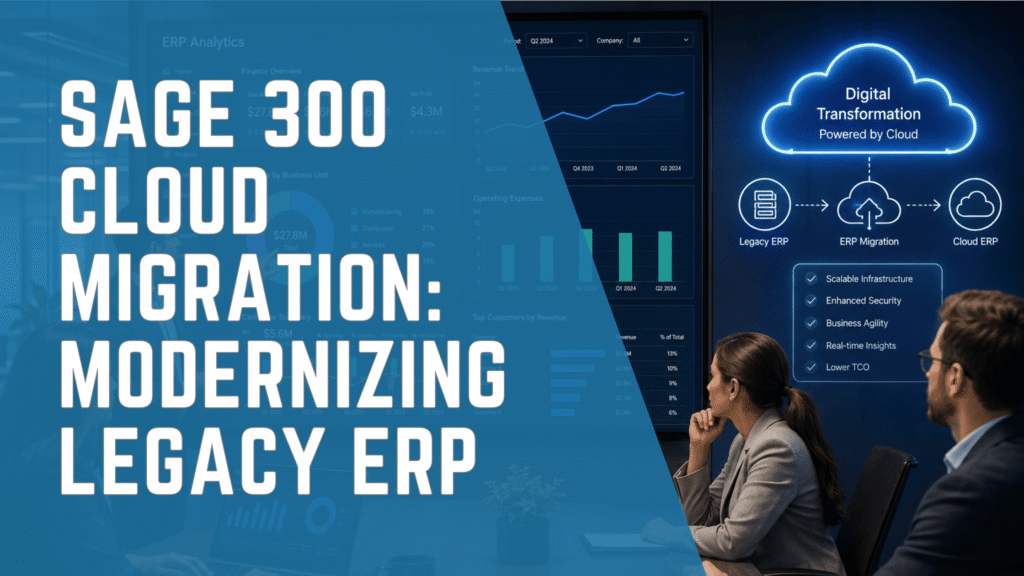
Organizations evaluating Sage 300 Cloud are typically at a critical inflection point in their digital transformation journey. While Sage 300 has long been a reliable ERP system for distribution, manufacturing, and multi-entity businesses, many companies now face limitations tied to legacy infrastructure, manual reporting, and scalability constraints.
However, transitioning to a cloud-enabled ERP environment is not simply a technical upgrade. It represents a strategic shift in how finance, operations, and IT teams collaborate, report, and scale.
Because of this, CFOs and IT leaders must evaluate whether their current ERP environment is sufficient for long-term growth or whether a broader modernization strategy is required.
Understanding Sage 300 Cloud in a Modern ERP Context
Sage 300 Cloud typically refers to Sage 300 hosted in a cloud environment rather than a fully cloud-native ERP system. Therefore, it is important to distinguish between:
- Hosted Sage 300 (SaaS infrastructure layer only)
- True cloud ERP systems (SaaS-native architecture)
- Hybrid ERP environments
In many cases, organizations assume they are moving to a modern cloud ERP when they are actually migrating from on-premise servers to a hosted environment.
This distinction matters significantly.
On the other hand, hosted Sage 300 still carries certain architectural limitations that affect automation, integration, and real-time reporting.
Why Organizations Consider Sage 300 Cloud Migration
Most organizations exploring Sage 300 Cloud migration are experiencing operational friction in one or more of the following areas:
1. Infrastructure Dependency
Legacy Sage 300 environments often rely heavily on internal servers and IT maintenance. As a result, costs and complexity increase over time.
2. Limited Real-Time Reporting
Finance teams frequently struggle with delayed reporting cycles. Consequently, decision-making becomes reactive rather than proactive.
3. Integration Challenges
Modern business applications such as CRM, eCommerce, and analytics platforms require seamless integration. However, Sage 300 legacy environments often require custom development.
4. Scalability Constraints
As businesses expand across regions or entities, system performance and consolidation processes become increasingly complex.
5. Aging User Experience
Older interfaces reduce productivity and increase training requirements for finance and operations teams.
Sage 300 Cloud vs True Cloud ERP Systems
Understanding the difference between hosted ERP and cloud-native ERP is essential for decision-makers.
| Feature | Sage 300 Cloud (Hosted) | True Cloud ERP (Sage Intacct / Acumatica) |
|---|---|---|
| Deployment | Hosted environment | SaaS-native |
| Updates | Manual or scheduled | Continuous automatic updates |
| Scalability | Moderate | High |
| Reporting | Batch-based | Real-time |
| Integration | Custom-heavy | API-driven |
| Infrastructure | Partially dependent | Fully managed |
| Innovation speed | Slower | Faster |
Moreover, CFOs often discover that hosted ERP systems do not fully eliminate operational inefficiencies—they simply relocate them to a managed environment.
Key Migration Considerations for Sage 300 Cloud Projects
Migrating to Sage 300 Cloud requires structured planning across finance, IT, and operations.
1. Data Migration Strategy
Data quality is one of the most critical success factors. Therefore, organizations must:
- Clean historical transaction data
- Standardize chart of accounts
- Validate multi-entity structures
2. Process Reengineering
Many organizations replicate legacy processes in the new environment. However, this limits ROI. Instead, workflows should be optimized during migration.
3. Integration Mapping
Modern ERP environments must integrate with:
- CRM systems
- Payroll systems
- Banking platforms
- eCommerce tools
4. Security and Compliance
Cloud environments require strict governance over:
- User access controls
- Financial data security
- Audit trails
5. Change Management
User adoption is often underestimated. As a result, training and communication must be embedded early in the project lifecycle.
Common Risks in Sage 300 Cloud Migration
While migration offers benefits, several risks must be managed:
- Underestimating total cost of ownership
- Poor data governance leading to reporting inaccuracies
- Over-customization of legacy workflows
- Lack of executive alignment
- Inadequate testing before go-live
Furthermore, organizations that treat migration as purely an IT project often experience lower ROI compared to those that treat it as a business transformation initiative.
When Sage 300 Cloud Is Not Enough
In some cases, hosted Sage 300 does not fully address modern business needs.
This is especially true for organizations that require:
- Real-time financial consolidation
- Multi-entity global reporting
- Advanced automation workflows
- High-volume transaction processing
- Deep SaaS integrations
In contrast, CFOs increasingly evaluate modern cloud ERP platforms such as:
- Sage Intacct for financial management and multi-entity accounting
- Acumatica for distribution, manufacturing, and mid-market scalability
- Sage X3 for complex supply chain and manufacturing environments
Therefore, the decision is not only about moving to the cloud but about selecting the right ERP architecture for future growth.
Sage 300 Cloud Migration vs ERP Replacement Strategy
Organizations typically fall into two categories:
1. Lift-and-Shift Migration
- Move Sage 300 to cloud hosting
- Maintain existing workflows
- Minimal process change
This approach is faster but offers limited transformation.
2. ERP Modernization Strategy
- Evaluate Sage 300 limitations
- Re-engineer financial and operational processes
- Consider full ERP replacement if needed
As a result, organizations achieve greater long-term scalability and efficiency.
How IWI Consulting Group Supports Sage 300 Cloud Transformation
With over 22 years of ERP consulting experience and 500+ successful implementations, IWI Consulting Group supports Canadian organizations through complex ERP modernization initiatives.
IWI works with CFOs, Controllers, and IT Directors to:
- Assess Sage 300 environments for cloud readiness
- Identify process inefficiencies and reporting gaps
- Design ERP migration roadmaps
- Implement Sage 300, Sage Intacct, Acumatica, and Sage X3 solutions
- Support long-term ERP optimization and integration
Furthermore, IWI acts as a strategic advisor rather than a software reseller, ensuring ERP decisions align with business growth objectives.
FAQ: Sage 300 Cloud Migration
What is Sage 300 Cloud?
Sage 300 Cloud typically refers to Sage 300 hosted in a cloud environment rather than a fully cloud-native ERP system.
Is Sage 300 a true cloud ERP?
No. Sage 300 is primarily an on-premise ERP system that can be hosted in the cloud.
What are the benefits of Sage 300 Cloud?
It reduces infrastructure management, improves remote access, and enhances system availability.
What are the limitations of Sage 300 Cloud?
It still has legacy architecture constraints, limited real-time reporting, and integration complexity.
How much does Sage 300 Cloud cost?
Costs vary depending on hosting provider, users, modules, and customization requirements.
Can Sage 300 be migrated to a modern ERP system?
Yes. Many organizations migrate to Sage Intacct or Acumatica for full cloud ERP capabilities.
What is the difference between Sage 300 Cloud and Sage Intacct?
Sage 300 Cloud is hosted ERP, while Sage Intacct is a native cloud financial management system.
Is Sage 300 Cloud suitable for manufacturing companies?
It can support manufacturing, but may require additional customization for advanced workflows.
How long does a Sage 300 cloud migration take?
Timelines vary but typically range from a few weeks (hosting migration) to several months (full ERP transformation).
Who should consider upgrading from Sage 300?
Organizations experiencing scaling challenges, reporting limitations, or integration issues should evaluate modernization.
Final Thoughts
Sage 300 in cloud-hosted environments represents an important step in ERP modernization, but it is not always the final destination. While hosted environments improve accessibility and infrastructure management, many organizations ultimately require deeper transformation to achieve real-time visibility, automation, and scalability.
Therefore, CFOs and IT leaders should evaluate not only how to move Sage 300 to the cloud, but whether their long-term ERP architecture supports business growth.
IWI Consulting Group helps organizations across Canada make these decisions with clarity, structure, and strategic insight—ensuring ERP investments deliver measurable operational and financial value.
If your organization is considering a move away from legacy Sage 300 environments or exploring alternative ERP solutions, IWI Consulting Group can help you define the right path forward.
Contact IWI consulting group to request an ERP consultation or assessment to begin your Sage 300 modernization strategy today.